Feb 11, 2013 | Bingo, My Digital Studio, Valentine's Day |
Valentine Bingo – for Heart #11. This is actually an old project I made a couple of years ago. I thought I would share it again – it seems to being getting a lot of hits on my blog – it looks like someone has it linked under free valentine idea site.
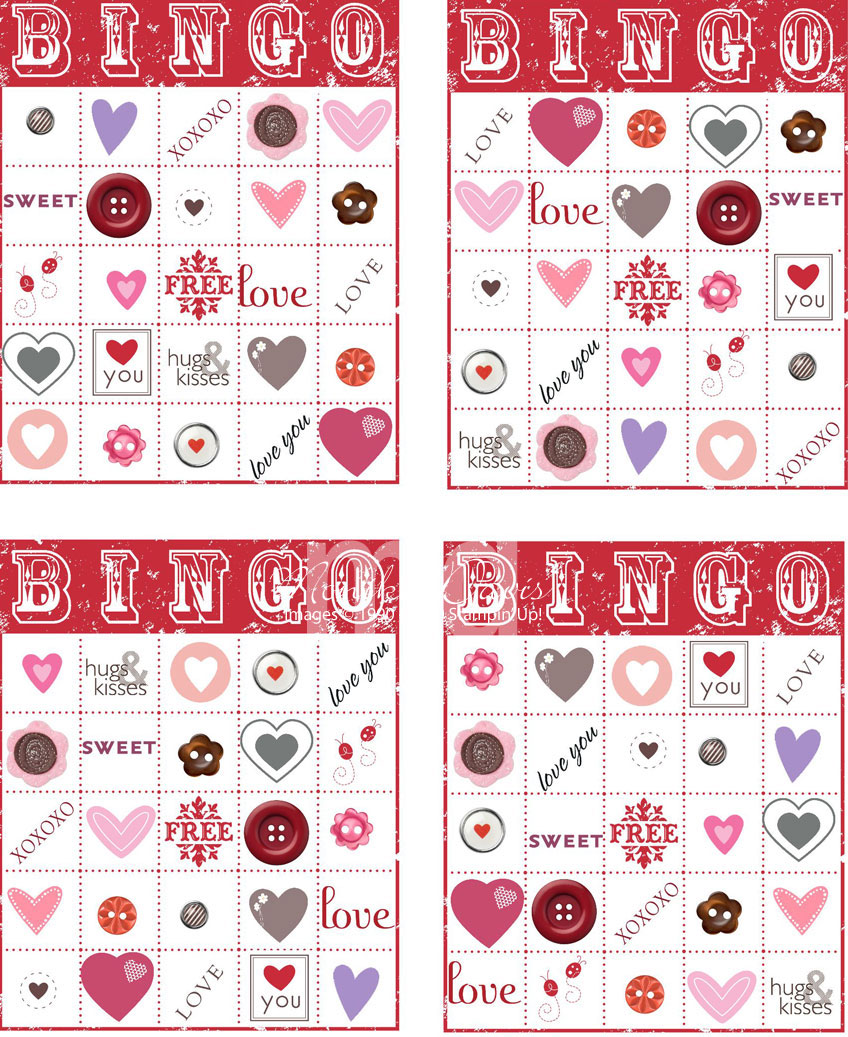
I used My Digital Studio to create a Valentine’s Day Bingo game. I made a Bingo card for each of the boys and an extra one that I cut apart with all the pieces.
 For the markers I punched hearts from Real Red card stock using the Small Heart punch.
In My Digital Studio I created an 8-1/2″ x 11″ photo album with one page that had four Bingo Cards on it. The Bingo card is a digital download. Then I went through all the stamp sets, embellishments and digital kits and selected different elements that were Valentine related to put in the squares. I resized any that were too big so they would fit in the square and used colors that were pinks, reds, and browns. I even used buttons and brads in some of the squares.
To make it easy I took an image, sized and colored it the way I wanted it and then copied it and positioned it in a different square on each of the Bingo Cards. I used the 4th card as the one I would cut the pieces apart for me to call while we played.
When I was done I just printed it out on my printer and cut the cards apart. This is what the My Digital Studio page looks like that I printed:

I love the Bingo card – both the My Digital Studio one and the actual stamp – it is fun to create Bingo cards to go with any theme that you need them too.
I hope you enjoy this Valentine themed Bingo game! I may have to make some for Easter this year. Have fun!

Feb 8, 2013 | My Digital Studio, Tags, Valentine's Day |
Really this is a super quick Valentine idea using one of the My Digital Studio downloads. I received this as a swap at Leadership from Laura Milligan. And if my boys were still young enough to need Valentine’s for school this would be perfect!

Here is a quick look at this cute idea from Laura –
- Get the My Digital Studio digital download called Officially Awesome Valentines Designer Template (#133009)
- Print the Owl Valentine (or choose a different or use the elements to design your own) on Whisper White card stock – cut to the size you want
- Attach to a piece of Razzpberry Ripple card stock – cut to create a flag
- Put a pencil in a 1×8 cello bag and seal shut
- attach the tag to the top of the bag with a piece of Gumball Green ribbon
- and you are done
- well you may want to sign your name on the back (or your child needs to do that)

I hope all these hearts are bringing you some Valentine inspiration. With Kyle away at college, Tyler having to TA a class on Thursday nights and Ryan having band practice on Thursdays – it doesn’t look like I’ll have all my boys together for Valentine’s day this year. So we are making alternate plans and having our “family Valentine dinner” on Sunday night after. Greg and I are going to sneak away for Friday/Saturday. And I guess the 14th may just be a quiet night – we shall see. More heart ideas are coming your way including a 2-page 12×12 scrapbook layout that you are going to love!

Jan 28, 2013 | Birthday, Cards, My Digital Studio |
You can use My Digital Studio to create a digital card to post on your friends Facebook pages on their birthday. That was what I did this weekend. I made two cards – a “girl” card and a “boy” card.

Boy birthday card

girl birthday card
And I’ve already used them since Facebook tells you whose birthday it is – assuming you check Facebook each day – when you see the notice then you can click over to their page and post a photo message. I created the cards in My Digital Studio and then exported them to a .jpg file so that I could use it anywhere I want. I may even get a couple of these printed.
Both were actually from templates. The boy one was easy – all I really added was the Happy Birthday stamp underneath. The girl one was a bit harder – I found a quote that I wanted to use – then I searched for stamps of the key words and added those in different colors ( I replaced the quote that was in the template) and then added the rest in text boxes. I did have one tricky word – smiles – the word was actually smile and I needed to add an ‘s’ – well thank goodness we have the new CROP a stamp feature in MDS2 – I was able to find another word in that stamp set with an ‘s’ and crop the rest of the letters away and tack the ‘s’ onto the word smile – I bet you didn’t even notice! Here is a photo so you can see what I mean

And one more thing on the girl card – the template was actually a 11 x 8-1/2″ scrapbook page and I converted it to the card and removed the photo box replacing it with the birthday cake stamps.
Oh the things you can do in MDS2!!! Hey that rhymes!
On Tuesday nights a group of us get together here near my house at the Panera restaurant and work on our MDS projectst together – we usually have a new trick or idea to share too. Come join us.
Dec 7, 2012 | family, Holiday Gift Making, My Digital Studio |
My Digital Studio Family Wall Art project

We had a lot of fun at our last My Digital Studio Class creating this Hybrid Wall Art Project. Cindy and I worked on this project together and we were both so pleased with how it turned out. Cindy is our local My Digital Studio “Queen” – go visit her blog for lots of MDS ideas – Nutmeg Creations – she will have a post about this project today too.
Have a great day!
Nov 27, 2012 | family, My Digital Studio, Scrapbook Pages |
Yes the wind was an issue and blowing through Ally’s hair. I had the chance to see my niece and nephew the other day when Noah played in a soccer tournament not to far away. While Noah played soccer, Ally went to the climbing tree at the end of the field. I went to take pictures of her and got these cute ones of her trying to keep her hair out of her face. Little girl smiles and giggles – what fun!

I created this for the challenge on mydigitalstudio.net – it was a scrapmap challenge. Go to the site and Like my page and leave comments. The winner of the challenge gets a free download. And I always love free downloads. Speaking of which everyone can get a free download today – look at this cute thing –

you can visit my website – www.monika.stampinup.net – go to the online store by clicking SHOP NOW – and find it in today’s digital downloads. It’s free. There are several other new ones today including more tags that match this one. And some reindeer games – really – not kidding…. go see.
Have a great day!
Nov 16, 2012 | Big Shot, My Digital Studio, Stampin' Up! Events, Stamps |

The Online Extravaganza promotion is our biggest online sale of the year! During these 10 days only, you can get incredible discounts-up to 50 percent-on some of your favorite products!
In addition, there will be three products 20 percent off for 24-hours only on both the first and last days of Online Extravaganza-our very own doorbusters! Woot!


Don’t miss these sales! If you have questions shoot me an email. Sale prices will be in my online store when the sale starts on Monday. Don’t miss the one day specials!

 For the markers I punched hearts from Real Red card stock using the Small Heart punch.