Jun 24, 2011 | Big Shot, Designer Series Paper, Faux Mother of Pearl, Scrapbook Pages |
I hope you aren’t getting sick of the scrapbook layouts. I guess I saved them all up to show at one time. This next one is a layout that I made this month. After I made the clock card using the Sense of Time stamp set and the Faux Mother of Pearl technique I decided I wanted to use that on a scrapbook page too. So that is what I did. The actual layout idea was from my friend Wendy Randall. She is so talented when it comes to scrapbook layouts. I often go back through the ones I have from her and use the layout again for a completely different idea – changing colors, stamps, and themes. The title I used on this layout is TIME TOGETHER –
 As is typical – I don’t have any pictures on this one yet. Looking at it later there is one thing I am changing – and that is the “TIME” on the left page is too light – it is in Crumb Cake – so I’m planning to switch it to be the Soft Suede card stock. There are several Last Chance List items on this layout – Sense of Time stamp set, Define Your Life stamp set, Elegant Soriee Designer Series paper, and the Cogs Punch.
 The base is Crumb Cake and there is a strip of Baja Breeze. I stamped the gears from the Sense of Time stamp set randomly around the corners. The strips of DSP are cut and then torn at the bottom and arranged at different angles on the page. And tacked down with a brad at the torn end on the bottom.
 The clock face is the Faux Mother of Pearl technique – you can see how to do this by going to my card post from a few days ago – click here .
The large circle and the cogs are cut from Soft Suede card stock. There is also an antique brad in the center of the clock.
 The right hand page is pretty much the same. The circle has the rest of the title cut with the Big Shot and the Billboard Sizzlit Strip die. The circle is tied with some Very Vanilla seam binding and Linen Thread.
From the Define Your Life stamp set I used the definition for the word “Together” punched with the Decorative Label punch.
I like the Faux Mother of Pearl technique and just finished 105 3×3 swaps for convention! I used that technique and one of the new In-Colors called Pool Party and a new stamp set from the catalog. Next week I’ll show you some sneak peeks and the new In-Colors. Thanks for stopping by today.

Jun 22, 2011 | Big Shot, Inspired by Nature, Scrapbook Pages |
Today I wanted to share a scrapbook layout that I made last month. It is the Mother’s Day layout that we made along with the Father’s Day layout I posted a few days ago.
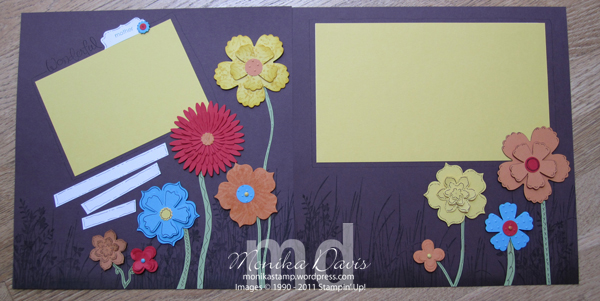 This is a two-page 12×12 layout. The background is Chocolate Chip and along the bottom I stamped with Early Espresso the grass from Inspired by Nature stamp set and the flowers from Just Believe stamp set. Then I sponged along the bottom to blend everything together.
 On the left page is my title that I stamped using the Wonderful Favorites stamp set that is on the Stampin’ Up! Last Chance list.
The flowers are all die cut using the Big Shot die-cut magazine using several different dies – Fun Flowers Bigz XL die, Flower Daisies #2 Bigz die, Flower Fusion Sizzlits dies, and Birds & Blooms Sizzlits dies. The Birds & Blooms Sizzlits are on the Last Chance list too.
The colors I used are Daffodil Delight, Tempting Turquoise, Poppy Parade, and Peach Parfait. There is lots of doodling all over the flowers, the stems (oh – those are free hand cut from Pear Pizzazz card stock), also around the frames and the journaling blocks. Some of the flowers are also stamped, sponged or embossed with the Polka Dot Embossing Folder. A few flowers have brads in their centers.
The idea came from a page I saw in a scrapbook magazine. I thought it turned out really fun and bright and cheery. It could really be used for all sorts of things besides mother’s day. Just change the title to suit your needs…..
Thanks for stopping by today!
Jun 19, 2011 | Big Shot, Retired List, Scrapbook Pages |
Today is Father’s Day and I wanted to share a scrapbook layout that I made for last month’s scrapbook class. We made two layouts one for Mother’s Day and one for Father’s Day. Although both are flexible enough that you could use them for various things. This is the masculine layout –
 This layout idea was a combination of a couple of different layouts that my friend Wendy designed some time ago. The colors are Not Quite Navy and Soft Suede with Basic Gray in the tools.
 There are a couple of retiring items in this layout – first the GoGo Boots Alphabet Sizzlits die set of the Big Shot. I use these whimsical letters a lot in my scrapbooking titles. And then the Sanded background stamp. I have been using it a lot and it really worked well with this layout.
 The tools from Totally Tool are stamped with Jet Black StazOn ink and then watercolored with an Aqua Painter and classic ink. Then they are all cut out – that the hardest part of this layout.
For the background – it’s a faux wood look. Use the Not Quite Navy ink pad and pull it across the card stock – starting and stopping in different spots so it looks like the end of a piece of wood. Then I used the Stampin’ Write marker to add nail heads here and there so the boards look like they are nailed down.
All the Soft Suede pieces are stamped over with the Sanded Background and sponged on the edges with Soft Suede ink – and round the corners with the corner rounder punch.
The title letters are die cut and some are stapled on and others are glued on and then I used the marker to add nail heads so they look like they are nailed to the board across the top. I added some of the twill tape on both pages.
Thanks for checking in today. Have a Happy Father’s Day!
Jun 9, 2011 | Contest Winner, Scrapbook Pages, Valentine's Day |
Yippee! I was selected as a So Shelli Creative Challenge winner! I got the email Thursday afternoon.
Good morning, Monika!
Shelli has asked me to notify you that she has selected your Sensational Scrapbook Spreads Challenge submission as a winner this month. Congratulations!
Thank you for sharing your creativity with us! We loved seeing your ideas. . .
And I get to pick a free stamp set! That’s always a good thing!
Here is a link to Shelli’s blog post – http://www.soshelli.com/contest/2011/6/9/sensational-scrapbook-spreads-challenge-winners.html
This is the layout that I submitted –

Here is the original post for this layout – http://monikastamp.wordpress.com/2011/02/11/i-love-this-valentine-scrapbook-page/
Come back later today for the UStamp Blog Hop!

Jun 8, 2011 | Big Shot, Build-a-Bear, Designer Series Paper, Retired List, Scrapbook Pages |
 I think it has been a while since I shared a scrapbook layout. This is one of my favorites so far this year. It uses the Create a Cupcake stamp set and Build a Cupcake Punch. I made this one as a birthday layout for myself. I just need to print the pictures to put on it.
 I guess that means I’ve revealed my age – just don’t tell anyone else. I almost created this page with the traditional bold colors in the Celebrations Designer Series paper but then I decided I wanted to do something different and chose to use the Build-A-Bear Workshop Pawsitively Prints Designer Series paper. Both are retiring with this current catalog so be sure to order them now if you want them.
The Build-A-Bear paper is really cute with stripes, checks, dots, plaid, and some flowers. The colors are Poppy Parade, So Saffron, Tempting Turquoise, and Pear Pizzazz.
The cupcakes are a variety of stamped and punched pieces and a few are embossed with the Square Lattice Embossing folder. The big flower is several layers of the Paper Flowers that I colored with Poppy Parade ink to match. In the center is a Jumbo Pear Pizzazz button. I used the Big Shot die cut machine to cut the big circle(Clear Circle) and the numbers (Simple Numbers).
I saw the idea for this layout in a scrapbook magazine and adapted it to a two page 12×12 layout and made it an all SU layout. My scrapbook class liked this layout and I hope you do too.
Thanks for stopping by today!
Last Chance Stamp Set List
Last Chance Accessory List
Last Chance Definitely Decorative List
May 25, 2011 | Create with Connie & Mary, My Digital Studio, Scrapbook Pages |
In between getting ready for my Card Maker’s Class tonight and creating a project for the Create with Connie & Mary Summer Edition class I spent a little time making a My Digital Studio scrapbook page. I just love this picture that I took of Aspen. I find it hard to take pictures of the dogs – either they are moving too much or their eyes get weird – and the red eye fixer doesn’t work because the dogs eyes don’t get the red glow they get a blue/gray glow – and I haven’t figured out how to correct it. So when I got this picture and he was still and his eyes were black I was happy. I came across it yesterday and decided to make this page.
 I started with a sketch idea from a scrapbook magazine. I added lots of stitching to this page – it comes from one of the new downloads from last week called – Simple Stitches & Corners. There are also two stitched rectangles – the one on the photo and the one on the label – those are actually from the Rock-a-Bye Designer Kit Elements – there are some stitched squares and I just stretched them to fit the shapes I needed. The stitching isn’t equal on all four sides because I did stretch it but I just wanted it to look like stitching and it worked. I really like the stitching added around the edge of the photo. The label that says “A loyal friend is PRICELESS” is a stamp that I enlarged – but I made sure to keep the proportions the same so it didn’t look awkward. I also played around with the EDIT OBJECT options for both my paper pieces and my stitching lines – you can adjust the size to be exactly what you want – the blue grid DSP in the center I wanted it to be a perfect square so I set the width and height to be 10.5 inches – remove the keep proportions option to do this and change the size (this is a square punch by the way) before filling it with paper. I did the same with the other two pieces of DSP making sure they were 12 inches long. I also edited the length of my stitching – I wanted the zigzag to be 10.5 inches like my paper so it wouldn’t hang over – so I used EDIT OBJECT to change it.
I’m really happy with how the whole page turned out. And have discovered that EDIT OBJECT is super helpful now that we can edit by inches instead of just pixels – if you don’t have the choice to look at your measurements by the inch that means you don’t have the most current updates – and you need to go get them – they have added and improved some of the wonderful features of My Digital Studio.
Have a great day!

 As is typical – I don’t have any pictures on this one yet. Looking at it later there is one thing I am changing – and that is the “TIME” on the left page is too light – it is in Crumb Cake – so I’m planning to switch it to be the Soft Suede card stock. There are several Last Chance List items on this layout – Sense of Time stamp set, Define Your Life stamp set, Elegant Soriee Designer Series paper, and the Cogs Punch.
 The base is Crumb Cake and there is a strip of Baja Breeze. I stamped the gears from the Sense of Time stamp set randomly around the corners. The strips of DSP are cut and then torn at the bottom and arranged at different angles on the page. And tacked down with a brad at the torn end on the bottom.
 The clock face is the Faux Mother of Pearl technique – you can see how to do this by going to my card post from a few days ago – click here .
 The right hand page is pretty much the same. The circle has the rest of the title cut with the Big Shot and the Billboard Sizzlit Strip die. The circle is tied with some Very Vanilla seam binding and Linen Thread.