Dec 13, 2010 | Big Shot, Christmas, class, Designer Series Paper, Scrapbook Pages |
Earlier this month I had a scrapbook class. Normally my class is at the end of the month but with Thanksgiving and Christmas falling at the end of these two months it makes getting the scrapbook class into my schedule a bit difficult. So instead I have one class at the beginning of December for both months. My regular schedule will start again in January. Anyway, this time I decided to go ahead and do Christmas pages so that everyone would have them ready for this years pictures (or could scrap older pictures if they needed to). For mine this layout will probably be for this years pictures and my second layout is going to be for some older pictures.
This idea started with a sketch in a scrapbook magazine and then combined a few ideas from different versions of that sketch. I love how this turned out and can’t wait to get some pictures on it. But it is pretty even without any pictures on it.
 The colors are Crumb Cake, Early Espresso, Cherry Cobbler, Old Olive, and Very Vanilla. The Designer Paper is the Holly Jolly paper in the Stampin’ Up! Idea Book & Catalog. The designs on this paper are just stripes and dots so it is easy to use for anything. The alphabet that I used for the title and the “ho ho ho” is the Jumble Alphabet. This set is just like it says a jumble of alphabet letters in various fonts so you could easily pair it up with any other alphabet that you might have to get the right combination of letter sizes. This set has a variety of big and small and upper and lowercase letters. It also means you don’t have to worry too much about things being straight. I did use my Stamp-a-ma-jig to line up my letters but free hand does a good job too.
 The main sections of the layout are Old Olive textured card stock that is 12″ x 6″ in size and I used a ruler and Stampin’ Write Marker to draw lines every 3 inches to create the squares. Then I used my Paper Piercer and Mat Pack to pierce along the lines so that it would look like faux stitching.
I cut pieces of the Holly Jolly Designer Series paper, Very Vanilla card stock, and Crumb Cake card stock into squares to layer on the Old Olive Squares. The Cherry Cobbler accents are cut with the Big Shot Die-Cut Machine and the Two Tags Die and the Hearts 7 Brackets Die.
 The main stamp set that I used is the Winter Post stamp set – it is one of my favorite ones. I even created a faux postage stamp for one of the squares.
To do this I stamped the reindeer in Early Espresso ink on Very Vanilla card stock and punched it out with the Scallop Square punch. Next I used the Early Espresso Stampin’ Write Marker and a ruler to draw the lines around the edges of the scallop square. I sponged the edges of the square and wrote 44 cents in the corner (since the postage will change in January again – this will be a reminder of what it cost to send cards this year). I attached the faux stamp to my square of Crumb Cake and the stamped over it with the Cherry Cobbler ink and the Santa Post cancel stamp.
 The right page of the layout has many of the same elements. The square with the snowflakes as the little pearls in the center. The “ho ho ho” has little stamp from Punch Pals scattered in between to add some more color.
The “2010” at the top is the Calendar Alphabet and Numbers stamp set. The zero is actually the letter ‘O’ from the set since it doesn’t have a zero by itself. These were punched out with the Jewelry Tag punch and then tucked under the top of the page.
I also used the new Dotted Scallop Ribbon Border punch to make the Early Espresso ribbon strips. I started with about a 1″ strip of card stock and punched all the way across to get the ribbon strip and then the left over straight strip is what I used to create the edge at the top of the panels.
At the bottom of the right page is the Heard from the Heart stamp set with an extra little heart punched using the small heart punch.
Satin Ribbon and Linen Thread finish off each of the tag accents. And a Bitty Button tied with Linen Thread was added to the large heart on the left page. Add your pictures and journaling in any of the empty squares. You could either leave the designer paper squares as they are or put pictures on those too. I’ll wait and see how many pictures I have that I want to add to the layout.
Like the page says “Welcome Christmas into your Heart”.
I hope this inspired you to create a Christmas layout – I’ll have another one coming so check back with me this week.
Holiday Treats & Tags Class – Dec. 17th – RSVP by Dec. 15th. – CLICK HERE.

Nov 3, 2010 | Bingo, Designer Series Paper, Holiday Mini Catalog 2010, Scrapbook Pages |
 This is the second layout that we made in my scrapbook class last week. I started with an 8-1/2″ x 11″ scrapbook page that we made as part of the Make&Takes at the Baltimore Regionals. I wanted to modify it to be a 12×12 page so I put it on a piece of More Mustard card stock. I cut 2″ squares from the Autumn Spice Specialty Designer Series Paper. Six of these were added to the left. I used my Stampin’ Write markers to color the large medallion image from the Day of Gratitude stamp set. This was cut out and I put it on the bottom left corner of the photo mat. The original page had cut outs of the leaves and acorns there and I moved those up to the top right corner.
 The next challenge was to add a coordinating page to make it a two-page layout. And here it is.
I added a larger Cajun Craze mat for a grouping of photos. And then some more of the 2″ squares but in the opposite corner. I stamped and cut another medallion and some more leaves and acorns.
I hope you like this fall themed layout.
And we are on to Bingo…..
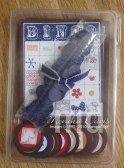 It’s BINGO TIME! We are playing Round 6 of Monika’s Blog Bingo. I have now filled group 7 and won’t be taking any more names right now – I”ll be taking a Bingo break after group 7 plays – I may play again in the future so I hope you will continue to visit my blog. See this POST for more details on how to play and the previous winners.
Here is piece #5 –the teddy bear from Family Accessories stamp set (stamped in Chocolate Chip).


Oct 31, 2010 | Big Shot, Bingo, Holiday Mini Catalog 2010, Scrapbook Pages |
If you are a Stampin’ Up! Demonstrator you receive the Stampin’ Success Magazine every month. It is full of ideas and articles for us. In the October issue there was an 8×8 scrapbook page that I fell in Love with. It used the French Foliage stamp set from the Holiday Mini Catalog. As it turns out I won that stamp set at the Baltimore Regional! And this was the first thing I created with it. I decided to make the 8×8 page (with a few changes). I was also preparing for my Scrapbook class but for it I do 12×12 two-page layouts. So I wanted to modify the 8×8 page to use it for my Scrapbook class.
Step 1 – make the 8×8 page –
I started with an Old Olive 8×8 piece of card stock. The strips of Designer Paper on the left side are from the Love Letter Designer Series Paper. With a piece of Soft Suede textured card stock that has been torn on one side. And a piece of Confetti Cream card stock that was been stamped with the word block from the French Foliage stamp set. The leaves were stamped on Confetti Cream card stock and cut out. I added a button from the Neutrals Designer buttons.
I cut the 2010 using the GoGo Boots Sizzlits dies and the Big Shot. I had the page finished and wasn’t sure what to use it for. One of the stamps in the set says “PARIS” – the little circle and I thought of Greg’s recent trip to Paris and thought this page would be perfect for that. So I looked through his pictures and printed some out. On the Decorative Label punch I decided to stamp the definition of Journey from the Define Your Life stamp set. And I added the little splatter image – right now it is an excellent replacement for the splatter that I miss from Itty Bitty Backgrounds.
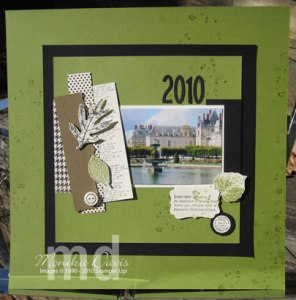 Step 2 – take the 8×8 page and turn it into a 12×12 page.
I kept it very simple and stuck with the square theme. I just place the original page on a black square and then on a 12×12 Old Olive square.
Now that it is done – I think it is pretty enough to frame – and I just might do that and hang it on the wall!
Step 3 – create a coordinating 12×12 page.
I normally have more than one picture on a scrapbook page. And with only 1 picture on the left I wanted to be able to add more pictures to the second page so I had to figure out how to do that. I stuck with the square theme and decided to create a grid on the second page.
It actually looked good with just the card stock and Designer Series paper squares on it – which is what i started with. But I had to add pictures.
The squares are 2×2″ squares. To add the pictures when I cut them into 2×2 squares and placed them in the grid. Pictures that I really wanted to show more than one square I placed side by side or top and bottom so you could see the full scene. They are scattered through out the grid and mixed in with the Designer Paper and card stock.
I added a piece of Designer Paper from the Newsprint pack – it has the map on it which I thought suited this journey layout.
I love how it turned out and everyone in my scrapbook class loved it too. While the stamp set is sort of a fall leaves theme – this set is easy to use for many things – I think this could have even been used as a wedding/anniversary layout. It is really a year-round set so use it for many things!
And HAPPY HALLOWEEN! I didn’t have anymore Halloween projects – I was done with all those and have been doing fall/Christmas and other stuff. So that is why you got a non-Halloween project today. I hope you liked it!
We are just starting with a new round of Monika’s Blog Bingo – Group 6.
It’s BINGO TIME! We are playing Round 6 of Monika’s Blog Bingo. I have now filled group 7 and won’t be taking any more names right now – I”ll be taking a Bingo break after group 7 plays – I may play again in the future so I hope you will continue to visit my blog. See this POST for more details on how to play and the previous winners.
Here is piece #2 –the flower from Because I Care stamp set (stamped in Concord Crush ).
).
Oct 16, 2010 | Bingo, Halloween, Punch Art, Scrapbook Pages |
I made this fun Halloween Scrapbook Layout for my class a couple of weeks ago. I really love how it all turned out. There are several punch art animals on the layout.
The colors look off in this picture – the background is Crumb Cake, the panel across the center is Basic Gray, the photo mats on the left page are Old Olive and Concord Crush, the title is Cajun Craze.
 The photo mat on the right page is Whisper White – I plan to put a collage of photos on this one.
The strip across the bottom is from the Wicked Cool Specialty Designer Series Paper.
There is also a Basic Black mat that was embossed with the Spider Web Embossing folder and the I inked it a little bit with the Frost White shimmer paint.
The stamp set is Wicked Cool. I just love the little candelabra’s – I stamped them in Basic Grey and then painted the flames with the Smooch Accent Ink.  It looks really good in person on the Crumb Cake card stock.
Then I made punch art – and can you see which punch I used for most of the creatures? I actually used the Owl punch – first of all he is himself as an owl. Then I used him to create the ghost. I used him again for the fat cat.
 The cat is the Owl body with the feet clipped off and glued back on a little higher to look like paws. The tail is from the branch on the Bird punch. I sponged the edges with White craft ink – added eyes, nose and whiskers.
The Tombstone is also made from a punch. I cut a strip of the Designer series paper exactly the width of the Designer Label punch and the slipped it into the punch to just punch the top to create the tombstone. The branches at the bottom are from the Bird punch.
The bats of course are the bat punch – quick and easy – sponged with a touch of white craft ink.
 And then there is one more special guest on my page – Mr. Rat. Do you see him? Can you tell what punch I used? It is also the owl punch! I need to go back and take a picture of how I cut it and add it to this post – but it is late and dark while I’m writing this so I’ll add it in the morning. His tail is the branch from the Bird punch – it makes a great tail. Can you tell that my rat is fuzzy? I used my Bone Folder to break down the fibers in the card stock until I could pull the layers apart. Then the inside is fuzzy.

How to make a rat.
I got the idea for the rat when I was in Pottery Barn looking at their Halloween decorations – they had lots of fuzzy rats on all of their displays for Halloween. So when I got home and worked on this layout the idea kind of popped in my head and it actually worked!
Now to get pictures for my layout – I think I’ll have to find some old ones because my boys aren’t little any more – so I don’t expect to have new Halloween pictures this year.
We are continuing with Monika’s Blog Bingo – let’s play….
It’s BINGO TIME! We are playing Round 5 of Monika’s Blog Bingo. I’m currently taking names for Round 7. See this POST for more details on how to join, how to play and the previous winners.
Here is piece #5 –the soccer ball image from All in the Family Accesories stamp set (stamped in Concord Crush).
Sep 2, 2010 | Big Shot, Bingo, Chipboard, Scrapbook Pages |
I created this scrapbook layout originally for the Utah Diva’s International contest this month and then I also used it for my scrapbook class. It features the new Stampin’ Up! Owl Punch. I love how these pages turned out.
 There is a lot of punching going on for this layout. First the Owls are punched using card stock and the Play Date Designer Series paper.
 Then all the circles – these are the 1-3/4″ Circle punch and all the other punches are layered on these. They are either stamped or embossed with the Big Shot and one of the embossing folders.
Stars are punched and embossed and then layered on the large star die cut with the Big Shot.
Some punched 1-3/8″ DSP circles – one is the Play Date paper and the other is the new Birthday paper.
Colors are Old Olive, Chocolate Chip, Tempting Turquoise, and So Saffron. The stamp set I used is Extreme Elements. Some of the photo layers are stamped and the chipboard title is stamped. Almost everything is sponged with Chocolate Chip ink – the chipboard letters, the circles, the stars, the owls.
The Chipboard letters were cut with the Big Shot and the Simple Alphabet dies. I used the outside edges left from the chipboard books that Stampin’ Up! sold in some of the mini catalogs – for this one I had a bunch of the heart board book scraps left and they were perfect for these skinny letters. I stamped directly on the chipboard in various colors.
These pictures are 10 years old – see I’m in no way caught up on my scrapbooking and I just work on stuff pretty randomly and scrap what I want when I want. Kyle was starting 3rd grade then and now he is starting college.

It’s BINGO TIME! We are playing Round 2 of Monika’s Blog Bingo. I’m currently taking names for Round 5. See this POST for more details on how to join, how to play and the Round 1 winner. So how is everybody doing – any three or four in a row yet?
Here is piece #5 – the dog image from All in the Family stamp set (stamped in Chocolate Chip). Good Luck!
Have a wonderful day!
Aug 31, 2010 | Bingo, My Digital Studio, Scrapbook Pages, Stampin' Up! Convention |
 This is another page from my Convention Album that I created in Stampin’ Up!s My Digital Studio. I have a few more things I want to fix up before I publish it. When I’m done I hope to add it as a slide show to my blog – but I have to figure out how to do that still. There is always something new to learn when it comes to this blog. The page above has pictures from the Awards night which included entertainment from Charley Jenkins.
Notice the photo in the bottom right corner – that’s me and that guy is the drummer from the band. He was the one they kept talking about being single. That night happened to be my wedding anniversary and I was spending it at convention. Becky thought it would be funny to get a picture of me with the drummer. So she told him it was my anniversary and that she wanted to take a picture and I don’t know if she planned it or not but when she took the picture he gave me this big kiss! Can you see by my face that I was surprised!
 And now it’s time to continue with Monika’s Blog Bingo!
It’s BINGO TIME! We are playing Round 2 of Monika’s Blog Bingo. I filled group 4 and I opened up group 5. See this POST for more details on how to join, how to play and the Round 1 winner.
Here is piece #3 – the coffee mug image from the Itty Bitty Bits stamp set (stamped in Chocolate Chip).

If you are part of my last ribbon share – I am working on cutting the ribbon and will let you know when it is ready for you. Thanks for stopping by today!

 The colors are Crumb Cake, Early Espresso, Cherry Cobbler, Old Olive, and Very Vanilla. The Designer Paper is the Holly Jolly paper in the Stampin’ Up! Idea Book & Catalog. The designs on this paper are just stripes and dots so it is easy to use for anything. The alphabet that I used for the title and the “ho ho ho” is the Jumble Alphabet. This set is just like it says a jumble of alphabet letters in various fonts so you could easily pair it up with any other alphabet that you might have to get the right combination of letter sizes. This set has a variety of big and small and upper and lowercase letters. It also means you don’t have to worry too much about things being straight. I did use my Stamp-a-ma-jig to line up my letters but free hand does a good job too.
 The main sections of the layout are Old Olive textured card stock that is 12″ x 6″ in size and I used a ruler and Stampin’ Write Marker to draw lines every 3 inches to create the squares. Then I used my Paper Piercer and Mat Pack to pierce along the lines so that it would look like faux stitching.
 The main stamp set that I used is the Winter Post stamp set – it is one of my favorite ones. I even created a faux postage stamp for one of the squares.
 The right page of the layout has many of the same elements. The square with the snowflakes as the little pearls in the center. The “ho ho ho” has little stamp from Punch Pals scattered in between to add some more color.








