Jul 18, 2012 | Almost Artisan, Big Shot, My Digital Studio, Stampin' Up! Convention |
Well it’s the final project for my Stampin’ Up! Artisan Design Team Entry. My last 3D project – this was the “big one”. It is a Baby Keepsake Shadow Box.

This is supposed to be the WOW project that made them say “Oh – this needs to be a finalist”. Well as you know that didn’t happen. But it is still a wow project and I hope you like it. There are lot of things going on in this project.
The background/inside of the shadow box was designed with My Digital Studio and printed through the professional print service multiple times (some are regular and others were heavy weight. The duplicate sheets were cut to create the crib and shelf. The crib I carefully cut out in between the slats for the front and the sides and then glued it together to make a 3dimensional crib.

I also created some owls in My Digital Studio and printed them on iron-on transfer sheets then ironed them on a small baby washcloth – there is one on all 4 corners.
The boxes are wrapped in Designer Series paper and then I added the letters and randomly added white Baker’s Twine and pearls to some of them. The punched owls are set on the shelf. And then I made a mobile that hangs from the ceiling using the spinner hands, baker’s twine and the little hearts.

In the corner is a little bear made with the fabric and the circles and brads for the eyes. With ribbon around the neck. I actually hand sewed it all. This is probably my least favorite part of this project. The eyes have pearls on them.

Inside the drawers I tucked a few things – for two of them I made little boxes to hold “1st tooth” and “lock of hair”. And then I had baby mittens and a baby wash cloth inside a couple. If I were really using it then they would all get filled up.
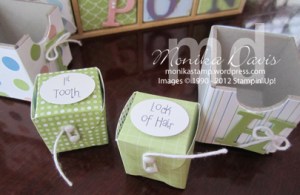
Around the outside I wrapped with a piece of the wide striped ribbon.

There is a lot to see. I am hoping it is on display for everyone to see at convention. Today is check-in day. We just had a great two days stamping and having fun with friends at the Starz Retreat. I’ll tell you more about that later. Oh and we went to the Copper Mine today – that was really neat.
It’s time to go check-in and get our convention bags. We have a busy day – see you later.

Jul 11, 2012 | My Digital Studio, Scrapbook Pages |
Go visit MyDigitalStudio.Net today. Cindy and I are the Guest Bloggers for today!
Our post features the My Digital Studio Hybrid scrapbook page that we made in our last club class. The pictures include Cindy and I working in my craft room. Here is another look at the page.
 Go read more about it on My Digital Studio.Net
Convention is almost here! I’m leaving in 5 days!

Jul 8, 2012 | Big Shot, My Digital Studio, Scrapbook Pages |

Look at this fun summer scrapbook layout! It’s bright and has lots of fun elements. We made this at my June Scrapbook class. The colors are Tempting Turquoise, Lucky Limeade, Daffodil Delight, Tangerine Tango, Island Indigo and Whisper White. The Designer Paper that I used is the Summer Smooches Designer Series paper. The sun is made by cutting a circle on the Big Shot and then punching with the Pennant punch and attaching them all the way around the circle. To create the waves I used a few different things – the bottom layer of paper was cut with the small scallop Adorning Accents Edgelit, the middle white layer was punched with the 1″ circle punch and then sponged with Island Indigo ink, the top layer is cut with the Large Scallop Edgelit die. I also looked for a stamp to use for the splash of the waves and finally ended up using the Everything Eleanor stamp set. Who would have thought of using that set for a summer beach page!
Then I used an idea from a scrapbook magazine to add the quilling to make the waves more dimensional. I cut thin strips with my Tabletop Paper Cutter. And then curled them around a skewer to create the curled waves. I used my multipurpose liquid glue to attach them to the layout. To finish the page I wanted to add the fish jumping in the waves. I searched my stamps for fish – nothing in my current collection has a fish in it. So now what. My Digital Studio to the rescue! I searched the Stampin’ Up! Digital Downloads and found one called Summer Splash. I quickly purchased it online, downloaded it and installed it and open My Digital Studio. I added the fish stamp and changed the colors to match my page – I printed out 6 fish on Whisper White card stock on my home printer – cut them out and added them to my page with Stampin’ Dimensionals. Ta-da! They are just perfect.

Now to add some fun summer pictures. But I’m going to have to find a new place to get them printed – the Wolf Camera near my house is going out of business – darn. I guess it’s time to try out some new places to see who I like.
I’m headed back to the craft room to work on convention swaps. I’ll be leaving in one week – this time next week I should be sitting on the plane getting ready to take off!
Jul 3, 2012 | My Digital Studio, Scrapbook Pages |
Happy Tuesday!
I have been working on several My Digital Studio projects lately and I wanted to tell you about one of them today. I have had this idea for a really long time and finally started working on it about 2 weeks ago. I wanted to make myself a personalized planner – a calendar that I can carry around to my workshops, classes and events and use to keep track of all my Stampin’ Up! Business related things that I need to do.
I made a list of the different things that I keep track of each month (like points towards earning the incentive trip) – some are things that I am doing and others are things my team is doing. I wanted a calendar – and the calendar function in My Digital Studio is so great for making exactly the calendar that I need. Probably the hardest thing was deciding on a “theme” – a color palette, designer papers, embellishments – that sort of thing. Naturally the best place to start would be a kit – since it has all those elements in one package. Then the new catalog came out June 1st and in the hostess section there is a new My Digital Studio Disc – it’s called Keep in Touch – and I decided it would be perfect for this project.
Since the Stampin’ Up! year starts in July my planner is a July 2012 through June 2013 planner – that’s the great thing about My Digital Studio is I can create my project exactly the way I want it – I don’t have to have a calendar that is Jan-Dec – I can start and end with any month I want. So here is my July calendar page –

I included the 12 months – this is the right side page and the left page has different spaces for me to write notes – calls to make, things to follow up on, etc. The back page is an Annual Summary page. The front page include our Stampin’ Up! Statement of the Heart. Then I added a front cover and back cover. I sent it out to the Stampin’ Up! printer and hope to have it back in about a week. I printed it as a soft cover photo book so that I can carry it around and write in it. I’ll post again when I have the real thing so you can see what it looks like printed.
Stampin’ Up! has new downloads today – You can see all the available Digital Downloads on my website. There is a new photobook template, a digital version of the retired Take Three stamp set from a couple of years ago, the new Polka Dot Parade Designer Series Paper, and digital Washi Tape.
Have a great day and get creative!
Jun 26, 2012 | Almost Artisan, My Digital Studio, Scrapbook Pages |
Well sadly I was not chosen as one of the Stampin’ Up! Design Team Artisan Finalists this year. I really thought I had a chance but I guess I’m not what they are looking for. The list of finalists is posted on the Stampin’ Up! FB page – congratulations to all of those that qualified as finalists! The good news is that I can now share my projects on my blog – no need to wait until after convention in July!
And another bit of good news is my push to earn my first Incentive Trip – it’s going to happen – I can feel it! One final push this week – I’m only about $700 away!! How exciting is that? Just a hand full of people need to place a $55 order and I’ll be there. Read more here about the 55 orders and watch the thermometer rise on the side of my blog. I’m almost there!!!
So now on to the project – that’s probably what you want to see anyway. This first project is one of my three scrapbook pages that I entered. I created a 12×12 scrapbook page using My Digital Studio – I sent it to Stampin’ Up! to print through the professional print service on heavy-weight card stock. I printed more than one copy and then cut the extra one in order to make a hybrid version – I added a few real elements to it so it had some dimension. So that gave me two versions – the original digital version, the hybrid version and then I created a second digital version. I didn’t have time to get the second one reprinted otherwise I probably would have submitted that one to the contest. Unfortunately we live so far away from Utah that the print service can take a while to get back to me. So here you go – let’s see what they look like –

Digital Version 1
This first one is my original Digital Version – this is Magnolia one of my two Jack Russell Terriers. I used overlays, sititching, digital tape, punches, the downtown grunge frames, buttons and seam binding.

Hybrid Version contest entry
This is not the best picture but this is the Hybrid version that I entered into the contest. Its even hard to see the hybrid elements in this photo. So I’ll tell you what they are. First I printed a second copy of the entire page and cut out the framed photo of Magnolia – I popped it up on Dimensionals and layered right on top of the same frame on the first copy. On one of the scallop circles I added a real paper flower, and a crumb cake button tied with Early Espresso Baker’s Twine. To the left of the photo I added two Baja Breeze buttons. And on the lower corner of the photo I added a real piece of Very Vanilla Seam Binding.

Digital Version 2
Here is the second Digital Version of the page – there are a few changes. The journling is a poem that my niece wrote about Magnolia. I changed the Very Vanilla Seam Binding to Crumb Cake. The Baja Breeze buttons were replaced with the Antique Brads. And the button inside the paper flower was changed to Baja Breeze. I like this second version better and wish I had the time to print and submit it for the contest. That’s probably why I wasn’t selected – they would have liked the 2nd version better too!
There are some brand new digital downloads from Stampin’ Up! today. You can see all the available Digital Downloads on my website.
Have a great day and if you need to order any Stampin’ Up! products please let me know – every order counts towards my goal even the digital downloads you order through my website!
Jun 19, 2012 | My Digital Studio, Stamper's Club |

It’s Tuesday – so it’s My Digital Studio day. I made this page earlier this year – it was part of Heather’s first MDS online class. When i saw her page I remembered these pictures that I took one summer where we went and got shakes at Johnny Rockets. These were taken at Barefoot Landing in 2003. This summer we were back at Barefoot Landing (Myrtle Beach area in South Carolina) but we did not go to the Johnny Rockets – I don’t even remember if it was still there – the area has a lake in the middle and this year we didn’t cross the bridges like we normally do. We did stop for some ice cream – I’ll need to scrapbook those pictures soon.
Stampin’ Up! released some new My Digital Studio digital downloads today and I saw on Facebook that the MDS 2 coming later this year is going to include the option to get a list of everything you used on your page just a t the press of the button – yeah! That will make it super easy to tell you what is on the page.
For this page I used elements from the Sweet Shop downloads that came out in the last mini catalog.
You can see all the available Digital Downloads on my website.
The thermometer is rising! Thanks to Leishman and Nicole for helping. I have about half of the 55 orders either placed or coming in still so we are half way there! But time is running out the 30th is approaching quickly – if you want to help me earn my first incentive trip – Read more here.
I got up and exercised this morning, went outside and watered the plants and picked blueberries! That’s a good start to a day – right?
Now I’m getting ready for my card class tonight at KSU – I’m looking forward to seeing the girls tonight.
Have a great day!









